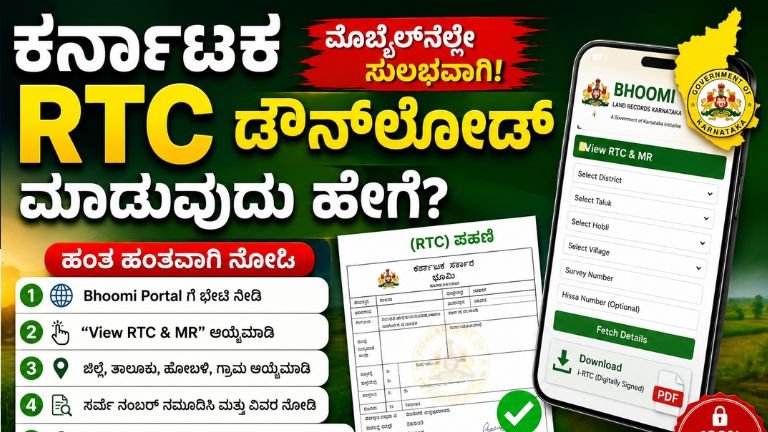
How to Download Karnataka RTC Online in 2026: Complete Step-by-Step Guide R 30
Land records are among the most important documents for every property owner in Karnataka. Whether you own agricultural land, plan to buy property, apply for a bank loan, or verify ownership details, the RTC (Record of Rights, Tenancy and Crops) is an essential document.
The Government of Karnataka has made it easier than ever to access land records online through the Bhoomi Portal. Citizens can now view and download RTC copies without visiting government offices, saving both time and effort.
In this detailed guide, you’ll learn everything about downloading Karnataka RTC online, including eligibility, required information, benefits, online steps, fees, and frequently asked questions.
What is RTC?
RTC stands for Record of Rights, Tenancy and Crops. It is commonly known as Pahani in Karnataka.
This official land record contains complete information about agricultural land, including:
- Owner’s name
- Survey number
- Land extent
- Type of land
- Crop details
- Mutation history
- Water source
- Tenancy details
The RTC is maintained by the Revenue Department of Karnataka.
Why is RTC Important?
The RTC serves as legal proof of land ownership and is required for several government and financial purposes.
Some common uses include:
- Applying for agricultural loans
- Property verification
- Buying and selling land
- Mutation process
- Court cases
- Government schemes
- Crop insurance
- Farmer benefits
- Land ownership verification
What is Bhoomi Portal?
The Bhoomi Portal is the official online land records system developed by the Karnataka Government.
Through this portal, citizens can access various land-related services without visiting the Taluk office.
Some of the services available include:
- View RTC
- Download i-RTC
- Mutation Status
- Survey Records
- Revenue Maps
- Land Ownership Details
- MR Status
- Citizen Services
Information Required Before Downloading RTC
Before starting the process, keep the following details ready:
- District
- Taluk
- Hobli
- Village
- Survey Number
- Hissa Number (if applicable)
Without these details, it may be difficult to locate the land record.
How to Download Karnataka RTC Online
Follow these simple steps to download your RTC online.
Step 1: Visit the Official Bhoomi Portal
Open the official Karnataka Bhoomi land records website using your mobile phone or computer.
Always use the official government portal to avoid fake websites.
Step 2: Select “View RTC & MR”
On the homepage, click the option labeled View RTC & MR.
This service allows users to search land records online.
Step 3: Choose Your District
Select your district from the dropdown menu.
For example:
- Bengaluru Rural
- Mysuru
- Belagavi
- Shivamogga
- Chikkamagaluru
- Davanagere
- Tumakuru
- Ballari
- Vijayapura
- Raichur
Choose the district where your land is located.
Step 4: Select Taluk
After selecting the district, choose your Taluk.
The available Taluks depend on the selected district.
Step 5: Select Hobli
Next, select your Hobli.
The Hobli list changes according to the Taluk selected.
Step 6: Select Village
Choose your village from the available list.
Make sure you select the correct village where the property exists.
Step 7: Enter Survey Number
Enter the Survey Number exactly as recorded in the revenue records.
If the land has sub-divisions, enter the Hissa Number as well.
Step 8: Click Fetch Details
Click the Fetch Details button.
The portal will display your land information.
Step 9: Verify Land Details
Check the displayed details carefully.
Verify:
- Owner Name
- Survey Number
- Area
- Land Type
- Village
- Mutation Details
If all information is correct, proceed further.
Step 10: Download i-RTC
For an officially certified copy, select i-RTC.
Complete the online payment (if applicable).
Download the digitally signed PDF copy.
What is i-RTC?
The i-RTC is the digitally signed version of the RTC.
Unlike the normal view, the i-RTC carries digital authentication from the Karnataka Government.
It can be used for:
- Banks
- Government departments
- Court cases
- Loan applications
- Official verification
Details Available in RTC
The downloaded RTC contains various details such as:
Owner Information
- Owner’s Name
- Father’s Name
Land Information
- Survey Number
- Hissa Number
- Total Area
Agricultural Details
- Crop Information
- Irrigation Source
- Soil Type
Revenue Information
- Mutation Number
- Khata Details
- Revenue Assessment
Other Details
- Nature of Ownership
- Encumbrance Information (where applicable)
Benefits of Downloading RTC Online
The online system offers several advantages.
Saves Time
No need to visit government offices.
Available Anytime
Access land records 24 hours a day.
Official Records
Receive digitally authenticated copies.
Faster Verification
Banks and government departments can verify documents quickly.
Transparency
Citizens can independently verify ownership records.
Common Reasons to Download RTC
People usually download RTC for:
- Buying agricultural land
- Selling land
- Property verification
- Bank loans
- Crop insurance
- Mutation verification
- Family property division
- Government schemes
- Court matters
- Legal documentation
Common Errors While Searching RTC
Sometimes users cannot find their land records due to simple mistakes.
These include:
- Wrong survey number
- Incorrect district selection
- Wrong Taluk
- Wrong village
- Typing mistakes
- Missing Hissa Number
Always verify all details before searching again.
Can RTC Be Downloaded on Mobile?
Yes.
The Bhoomi Portal works on smartphones.
You can use:
- Android phones
- iPhones
- Tablets
A stable internet connection is recommended.
Is RTC Free?
Viewing basic land information is generally available online.
However, downloading an officially certified i-RTC may require payment of a nominal government fee.
The applicable fee may change according to government rules.
Difference Between RTC and i-RTC
| RTC | i-RTC |
|---|---|
| Basic land record | Digitally signed official copy |
| Used for viewing | Used for official purposes |
| Limited verification | Accepted by banks and government offices |
| Online display | Downloadable PDF |
Tips Before Downloading RTC
Follow these tips for a smooth experience:
- Keep survey number ready.
- Verify district and village.
- Use the latest browser.
- Ensure a stable internet connection.
- Download the PDF immediately.
- Save a backup copy.
Frequently Asked Questions
What does RTC stand for?
RTC stands for Record of Rights, Tenancy and Crops.
Is RTC proof of ownership?
RTC serves as an important land record showing ownership and agricultural details, but legal ownership may also depend on other registered documents.
Can I download RTC without visiting the Taluk Office?
Yes. The Karnataka Bhoomi Portal allows eligible users to view and download RTC online.
Can I use RTC for bank loans?
Banks often request RTC along with other land documents while processing agricultural loans.
What if my land details are incorrect?
You should contact the concerned Revenue Department or Taluk Office to request corrections.
Can I download old RTC records?
Availability of historical records depends on the data maintained in the Bhoomi Portal.
Download
The Karnataka Government’s Bhoomi Portal has simplified access to land records, making it convenient for farmers, landowners, and property buyers to obtain their RTC online. By following the correct steps and entering accurate land details, users can quickly view and download their RTC without visiting government offices.
For official purposes such as bank loans, legal proceedings, or government schemes, it is recommended to download the digitally signed i-RTC copy. Always verify the information in your RTC carefully and ensure your land records are up to date.